
Getting started as a teacher
Setting up takes about two minutes. You create an account, tell HallTracker which school you teach at, and confirm you're a school employee. HallTracker is for teachers and school staff only.
Steps
-
1. Create your account
Choose Start Free, enter your name, a username, your email and a password, then check your inbox and open the verification link we send you.
-
2. Confirm you're an educator
Tick the box confirming you're a licensed educator, school administrator or authorized school employee, then choose Continue. If you registered with a school or district email address, that confirmation also verifies your school association.
-
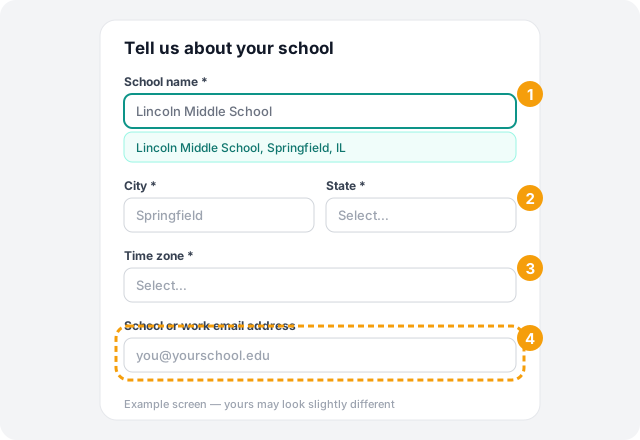
3. Tell us about your school
Start typing your school's name. If it's already in HallTracker, pick it from the list: you'll join that school's workspace and its details fill in for you. If it isn't listed, enter the city, state and time zone and HallTracker creates a workspace for your school.
If you registered with a personal email such as Gmail or Yahoo, enter your school or work email too. We'll send a one-time verification link to it.
-
4. Add your classroom details
Your position, room number and grade levels are all optional, and you can change them any time from your profile. Choose Get started to open your HallTracker.
What to expect
- Creating a new school: your account is approved right away and you're set up as that school's administrator.
- Joining an existing school: an administrator approves your account before you can use the school's features.
- School email: school and district features stay locked until the school email link is verified. You can keep setting up while you wait for it.
Troubleshooting
Still stuck? Contact us and we'll help.